Editable 2024 Daily Productivity Planner: A Structured Resource for Personalized Planning
Finding a daily planner that balances print-ready professionalism with genuine editing freedom can be surprisingly difficult. The Editable 2024 Daily Productivity Planner arrives as a practical digital download that tackles both needs. It offers a complete daily planning framework, a full 2024 calendar, and full Canva editability — all wrapped into a clean, high-resolution package. Whether you print the pages as-is for personal use, customize every section for a client-facing brand, or import the image files into your favorite tablet app, this planner provides a level of control that static PDFs rarely match. The following observations explore the factual makeup, real-world usefulness, and potential limitations of this tool, so you can determine if it fits into your own workflow or product lineup.
What You Actually Receive in the Download
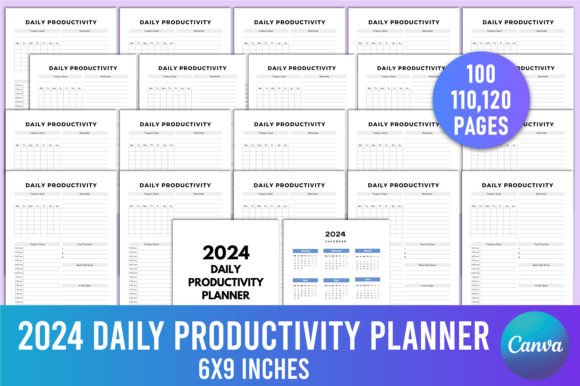
Rather than a single file, the product includes multiple formats that serve distinct purposes. At the center is an editable Canva link, which unlocks the planner’s full design flexibility. Alongside that, you receive a high-quality print-ready PDF, as well as JPG and PNG versions of each page. This combination means you can skip the editing entirely and go straight to printing, or you can spend time inside Canva adjusting colors, fonts, and layout elements before exporting. The package also includes:
- A Belongs To page for ownership details
- A complete 2024 calendar with monthly overviews
- Daily productivity pages designed for consistent daily use
- Page count options of 100, 110, or 120 pages, giving you flexibility depending on how much daily coverage you need
Having the files in JPG and PNG format is a thoughtful addition. These image files are well-suited for digital planning apps like GoodNotes or Notability, or for importing into custom documents without dealing with PDF cropping. The PNGs in particular retain transparency where applicable, which can be useful for layering in more complex design projects.
Print Specifications and Why They Matter
The technical specs of the Editable 2024 Daily Productivity Planner reveal a product built with print shops and home printers in mind. Each page is set to 6 x 9 inches, a slightly slim and highly portable trim size that works well for daily carry. Inside, the file uses 300 DPI, CMYK color mode, and no bleed. These choices are deliberate.
Keeping the design at 300 DPI ensures that text and any graphics print sharply without visible pixelation, whether you use a laser printer at home or send the file to a commercial printer. CMYK coloring reduces the chance of color shifts when moving from screen to paper, a common frustration when designers build in RGB without considering the print process. The absence of bleed simplifies printing greatly: you won’t have to worry about trimming or border adjustments. However, “no bleed” also means that the design does not extend to the very edge of the paper, so if you prefer full-bleed colorful edges, this may not satisfy that aesthetic. For clean, safe margins and a straightforward print experience, the configuration is reliably practical.
Daily Productivity Layout: Expected Structure and Rhythm
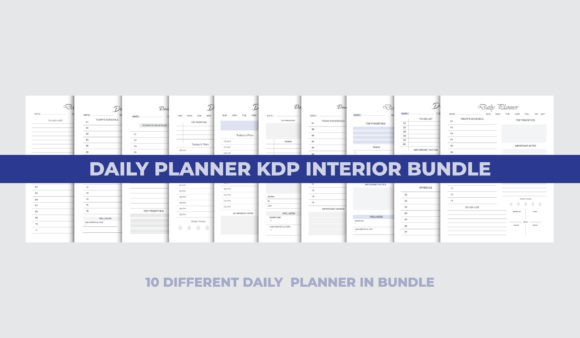
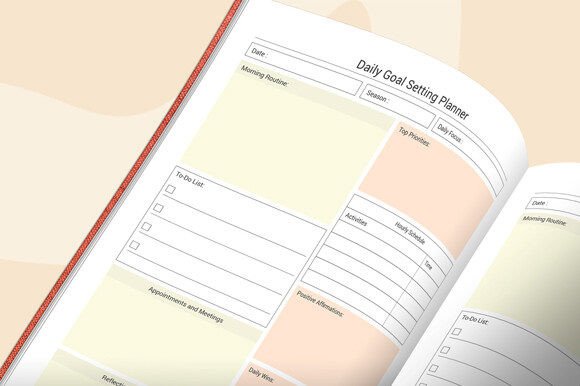
While the exact interior arrangement can vary slightly between versions, a typical daily productivity page in this type of planner focuses on giving you a clear framework for a single day. Based on the product description and common daily planner conventions, you can expect dedicated spaces for top priorities, a timeline or schedule block, a to-do list, notes, and perhaps a small reflection area. The strength of such a layout lies in its repeatability. Each day, you encounter the same structure, which builds a habit of intentional planning rather than reactive scribbling.
Having a physical daily page also removes the notification-heavy distractions that come with digital planning apps. For professionals who spend hours looking at screens — marketers, developers, writers — the tactile act of writing in a printed book or tablet with a stylus can improve focus and memory retention. The planner’s design supports that shift without locking you into a rigid system. Because the original file is editable, you can alter the daily layout if, for example, you’d rather merge the priority section with a time-blocking table, or if you need less space for notes and more for tasks.
Editing in Canva: How the Editable 2024 Daily Productivity Planner For Canva Expands Possibilities
Perhaps the most notable feature of this product is the Editable 2024 Daily Productivity Planner For Canva link. Canva’s browser-based editor requires no design expertise, yet it opens up a surprising range of modifications. You can change the title page, add your own logo or business name to every page, adjust the font to match a brand style, or even recolor elements to align with a specific aesthetic. For entrepreneurs who create planners as resale products, this means you can quickly produce a unique version for your audience without starting from scratch.
Practical applications include:
- A productivity coach personalizing a planner for a group program, inserting coaching prompts into the notes section
- A blogger offering a custom-printed daily planner as a subscriber freebie, with their website url subtly included
- A small business owner creating a consistent set of internal planning tools for team members, with company mission statements on a few pages
Because the Canva link is included, not just a locked PDF, you retain full editing control. You can duplicate the template and work on multiple variations simultaneously. That level of reuse significantly extends the value of the initial purchase beyond a single printed copy.
Quality and Consistency Across File Formats
When a planner bundle provides four file types, inconsistency can creep in. Based on typical product design for such planners, the PDF, JPG, and PNG outputs should mirror the Canva source exactly when exported correctly. The 300 DPI resolution holds steady across formats, and the CMYK color space ensures that the PDF prints as expected while the RGB-converted PNGs and JPGs look correct on screen. In practice, you might notice slight color variance on some tablet screens, but that’s inherent to any image file viewed on a backlit display; for print, the PDF acts as the source of truth.
One area where attention matters is page count. The planner comes in options of 100, 110, or 120 pages. If you plan to print the full document at home, double-check that the page count matches the file you selected. With the Canva version, you can remove or duplicate pages as needed, giving you near-complete control over the final thickness and content volume of the printed book or binder.
Who Will Benefit Most from This Planner
The Editable 2024 Daily Productivity Planner isn’t a one-size-fits-all solution, but it does align well with several specific user groups. Independent creators and sellers — such as Etsy shop owners, PLR content providers, or course creators — will find the editable format especially valuable because it lets them rebrand and resell a fully functional daily planner. Freelancers and remote workers who prefer analog planning can print pages week by week, using the PDF’s daily structure to stay on top of shifting deadlines without a subscription app. Educators and coaches can tailor the pages with prompts relevant to their students or clients, turning a generic planner into a targeted accountability tool.
Even serious hobbyists, like journalers or bullet-journal enthusiasts, can take advantage of the JPG pages for digital planning or use the clean layout as a base to add hand-drawn elements after printing. The editable calendar also means that, with a little Canva work, you could adapt the year reference to use with a future year — a practical long-term extensibility bonus.
Potential Limitations to Keep in Mind
No product exists without trade-offs. The no-bleed design, while print-friendly, prevents edge-to-edge decorative backgrounds — something some users expect in a premium-looking planner. If your brand relies heavily on full-page colored borders or illustrations that extend off the page, you may need to add bleed manually, which requires a more advanced design tool than Canva. Additionally, the daily layout, while flexible, assumes a certain approach to planning. It may not naturally accommodate highly detailed hourly tracking if that isn’t included by default; editing in Canva can solve this, but it requires time and patience.
The reliance on Canva for editing may also exclude users who do not have a Canva account or who prefer working offline with desktop software like Adobe InDesign. While the PDF can be used as-is, the editing link won’t translate to another platform without effort. Finally, while the Belongs To page and 2024 calendar add a nice finishing touch, they are static unless you manually update them each year — something the Canva link partially addresses, but the pre-built PDF remains locked to 2024.
Longevity and Reusability Beyond 2024
An interesting aspect of the Editable 2024 Daily Productivity Planner For Canva is that it isn’t strictly tied to the calendar year. Because you can change every element inside Canva, the daily pages can be reused indefinitely. You can duplicate the template, update the calendar to 2025 or beyond, and remove the “2024” branding. The underlying daily structure remains valuable regardless of the year. For someone building a planner empire or wanting a consistent annual planning system, this means the asset functions more like a template engine than a one-off product.
From a print perspective, the high-resolution PDFs can be stored and reprinted many times. As long as you keep your original download, you can produce bound books, coil-bound notebooks, or simple stapled sets whenever you need a fresh copy. The 6x9 size also makes it easy to find compatible covers or binders if you choose to print individual pages rather than a perfect-bound book.
Final Observations on Integrating the Planner
Deciding whether to incorporate the Editable 2024 Daily Productivity Planner into your day or your product catalog really depends on your need for a quality base that you can refine yourself. It arrives with professional-level print specs, multiple file formats for different use cases, and a straightforward daily framework that doesn’t overcomplicate the planning process. The Canva link distinguishes it from many similar products that offer only a fixed PDF, and that editability is where the majority of the long-term value sits.
For anyone who regularly creates planners, leads productivity workshops, or simply wants a reliable paper-based daily system they can tailor to personal taste, this resource offers a strong foundation. The few limitations — no bleed, a layout that might need slight adjustments for some workflows, and a dependency on Canva for full editing — are generally outweighed by the practical advantages for the intended audience. When used thoughtfully, it can save a considerable amount of layout time and printing guesswork, while still leaving room for your own creative or organizational choices.