Pocket Planner 2024-2025: Compact Customizable Organizer
What the Pocket Planner 2024‑2025 Actually Includes
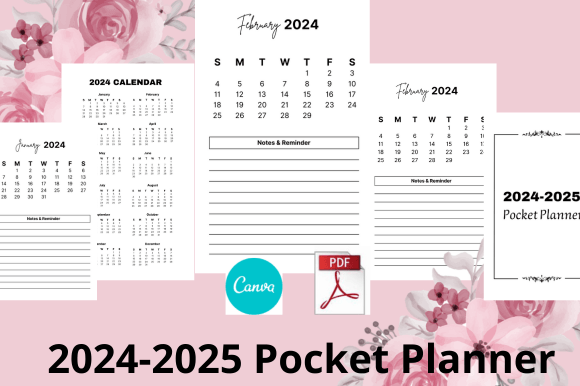
At its core, the Pocket Planner 2024‑2025 is a ready‑to‑edit design template built inside Canva. Instead of spending hours building a planner from scratch, you get an 80‑page layout that covers two full years. The file is structured for both personal printing and commercial use on Kindle Direct Publishing, giving you a printable PDF that fits the 4 x 6.5‑inch format. Inside, you will find practical yearly spreads: an annual overview calendar 2024 2025, contact list pages, password tracker pages, dedicated notes pages, and to‑do list pages. There is no physical shipment. Everything lives as a digital asset you can customize with Canva’s drag‑and‑drop tools.
The combination of structure and creative freedom means you can keep the core layout and simply change the colours, fonts, or background images to match a specific brand or personal taste. For someone who has never designed a planner before, that shortcut can remove the fear of starting with a blank screen. For experienced Canva users, the template becomes a launchpad to test multiple visual directions without re‑creating functional elements like the annual overview or tracker grids.
Why Different People Care About the Same Editable Template
On the surface, a pocket planner looks like a product for one type of user: the paper‑loving stationery enthusiast. In reality, the editable template behind the Pocket Planner 2024‑2025 appeals to a wider circle. A freelancer may value the password tracker and to‑do pages as a lightweight business tool. A marketing professional might repurpose the template as a lead magnet or content upgrade. A home educator sees reusable routines in the notes and monthly overview design. Understanding those angles helps you decide whether the resource supports your own needs, whether you aim to organize your personal week or sell a polished product on Amazon.
People also differ in what they consider non‑negotiable. Some want speed: open the link, export a PDF, upload to KDP. Others want visual control so every element reflects their personal or client brand. A third group cares most about the commercial angle—niche‑specific covers, interior page variety, and a size that reduces printing costs without looking cramped. The 4 x 6.5‑inch KDP calendar template serves all three priorities, but it helps to know where you land on that spectrum before customizing.
How Beginners Learn Without Overwhelm
If you have never used Canva or designed a printable product, the template acts like a guided exercise. You don’t need to understand margins, bleed, or table creation. The charts are already placed, the annual overview is mapped, and the password tracker fields are logically arranged. Because the template is 100% editable, you can start by making small changes—swap one colour, replace a header font—and immediately see how those tweaks behave inside a real layout. That low‑risk experimentation builds confidence for bigger edits later.
A beginner might spend an evening personalizing the to‑do list pages while leaving the monthly calendar untouched, then export a printable PDF document ready to be uploaded to KDP for personal use. Over time, the same person may return to the Canva link and add a second interior style, eventually feeling ready to publish a series of pocket planners under their own brand. The learning curve is gentle because the functional skeleton already works.
For Professionals and Small Business Owners: Speed Meets Brand Identity
Not everyone has the bandwidth to design a productivity tool from zero. A service‑based entrepreneur or a small marketing team often needs a polished, low‑cost asset they can personalize fast. In this context, the Pocket Planner 2024‑2025 becomes a white‑label resource. You adjust the primary colour palette, insert your own logo, maybe tweak the font pairing, and within an hour you have a branded client gift or a shop‑ready digital download.
Because the file contains both annual calendar grids and functional pages like contact lists, it naturally suits travel‑sized planning systems. A business coach might hand out printed copies during a workshop, pairing the to‑do and notes sections with a time‑blocking exercise. A virtual assistant could use the Canva link for editing to produce a cohesive set of planning sheets that her clients fill in digitally. In all these cases, reliability comes from the tested structure; brand expression comes from the layers you add on top.
KDP Creators and the Commercial Angle
For publishers and side‑hustlers who sell low‑content books, the template addresses specific pain points. Interior design eats time. Getting the alignment of a 4 x 6.5‑inch chart wrong leads to rejected uploads or poor customer reviews. The included annual overview calendars already respect the compact trim size, so the technical guesswork is reduced. You can focus on market research and cover design, then use the 80 page design template as the interior backbone of multiple planner variations—a fitness pocket log, a minimalist student agenda, or a meal planning companion.
Commercial users often value clarity around what the product contains and what it doesn’t. The template delivers five core page types across 80 pages: contact list, password tracker, notes, to‑do, and the full annual overview. Because the layout is not cluttered with irrelevant filler, you can clone pages to change the page count or mix in other templates later. If your KDP niche depends on a clean, professional look that customers can actually use, having a tested format saves time and reduces the risk of returns.
Educators, Remote Workers, and Daily Mix‑Use
Teachers and students often need a planner that moves easily between a bag, a desk, and a home office. The digital version of the Pocket Planner 2024‑2025 can be loaded into a note‑taking app like GoodNotes, while the printable one sits beside a laptop. A remote worker might keep a printed quarterly chunk on hand, using the notes pages during video calls and the to‑do section for weekly sprint reviews. The annual overview gives a visual map of the entire 2024–2025 stretch, which is especially helpful for semester planning, project timelines, or tracking family commitments side‑by‑side with work deadlines.
For this group, the flexibility of an editable template means they are not locked into the creator’s original aesthetic. A soft, neutral palette might suit a study space; a brighter version could resonate with a creative team. Because the Canva file can be adapted and re‑exported multiple times, you can keep the functional skeleton intact while evolving the look across seasons or projects.
Hobbyists and the Joy of Personalized Organization
Not every user needs a commercial output. Many people simply enjoy the craft of aligning a beautiful tool with their lifestyle. A bullet journal enthusiast might fall in love with the password tracker layout and decide to redesign the entire set to match their favourite washi tape colour. A stationery blogger could use the template as a base for a “plan with me” video, swapping backgrounds and sharing the process without starting from a blank Canva page. The creative satisfaction comes from the fact that the template does the repetitive alignment work while leaving aesthetic decisions entirely up to you.
Those who like hybrid planning can print the 4 x 6.5‑inch pages double‑sided, punch holes, and create a compact ring‑bound flipbook. The small chart size is deliberate; it fits into most handbag slots, glove compartments, or jacket pockets. For hobbyists who value portability alongside design, that physical format choice makes the difference between a planner they actually carry and one that stays at home.
What the 4 x 6.5‑Inch Format Brings to the Table
The compact size is not a random afterthought. A pocket planner needs to feel substantial without adding bulk. At 4 by 6.5 inches, you get enough writing room for a contact name and three phone numbers, for a weekly to‑do list that isn’t squeezed, and for an annual overview that remains readable. From a printing and fulfillment perspective on KDP, the common trim size keeps production costs predictable, which is important when you want to stay competitive on price without sacrificing margin.
For those who use the planner digitally, the dimensions translate well onto tablet screens. A 4 x 6.5 proportion viewed in landscape or portrait orientation feels natural, especially when annotating with a stylus. The annual overview grids have enough spacing between columns to tap accurately, and the password tracker boxes are generous enough for digital ink or typed text. When you marry that usability with the ability to swap out a header image or accent colour inside Canva, you get a template that adapts equally well to paper and pixel workflows.
Creative Freedom Without Starting from Scratch
A common hesitation with premade templates is the fear of a cookie‑cutter look. Here, Canva’s environment acts as a safety net. You can overhaul the visual identity completely—introduce gradient backgrounds, use handwritten script for section headers, embed a subtle logo pattern—while preserving the table structures and page sequence. The editable template behaves like a framework: the contact list pages will always exist in the same relative position, but they can look vastly different from one user’s export to another’s.
For anyone juggling multiple projects, this blend of structure and customization means you can produce a cohesive product without reinventing the wheel. A creator who launches a new KDP planner every month can reuse the same interior skeleton, changing only the cover design and page accents. The time saved compounds quickly, freeing energy for marketing, keyword research, or simply enjoying a non‑design part of the day.
Finding Your Fit with the Pocket Planner
Before you open the Canva template, it helps to articulate what you truly want from a two‑year organizer. If your primary goal is to sell on KDP, ask whether your target audience needs a specific niche twist—like a budget tracker or a habit log—that you can layer onto the existing password tracker and notes layout. If you are a busy professional looking for a personal system, consider whether the annual overview calendar’s layout matches the way you mentally chunk your year. A person who thinks in quarters will navigate the spread differently than someone who prefers a monthly snapshot.
The template’s value rises when your needs overlap with its core components. If you already know you need durable contact lists, a secure place for passwords, and daily to‑do capture in a portable size, the Pocket Planner 2024‑2025 cuts hours of design time. If, however, your dream product requires extensive goal‑mapping worksheets or intricate meal plans, you might still use the base annual overview and notes sections, then build supplementary pages around them. The Canva foundation doesn’t lock you into a single outcome.
Long‑Term Usefulness Beyond the Calendar Year
An annual overview covering both 2024 and 2025 extends the life of a planner past a single school or fiscal cycle. That may matter deeply to a creator who wants to list a product on KDP that stays relevant for more than a few months. It also matters to users who track multi‑year goals—saving milestones, certification timelines, or renovation schedules. The password tracker pages and contact lists are timeless by nature, so even after the calendar pages expire, the notebook section retains utility.
When you edit the template inside Canva, you have the option to update the years in the future without redesigning the structural elements. That means the initial customization effort pays forward. The same 4 x 6.5‑inch file can evolve into a 2026–2027 pocket planner by adjusting only the calendar grids, preserving the to‑do lists, notes, and tracker layouts you already liked. Long‑term thinking is not mandatory, but it is a quiet advantage that separates a one‑off purchase from a reusable design asset.
The people who get the most from this template are those who align it with a clear project. A freelance virtual assistant might use it to produce a branded client organization kit. A work‑from‑home parent could print and bind it as a family command centre that slips into a bag. A first‑time KDP publisher might finally see the technical side click because the hard parts—size alignment, bleed awareness, page sequence—are already handled. Recognizing where you sit on that spectrum helps you open the Canva link with purpose instead of guesswork.