Project Draft Planner: Your Printable Planning Template
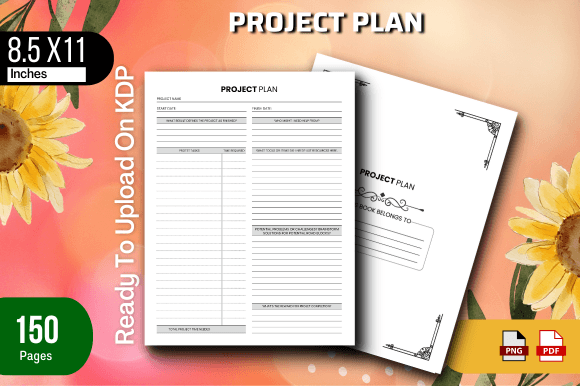
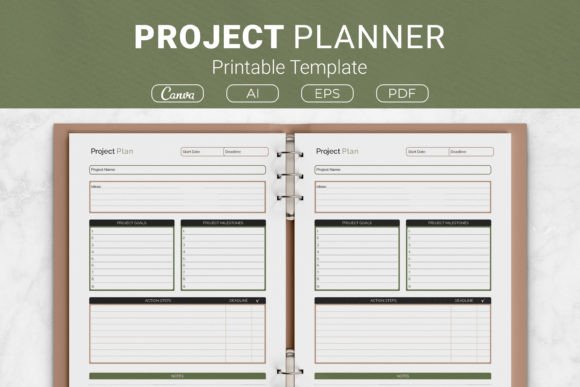
Professional project planning rarely demands a suite of complex applications. Sometimes the most effective tool is a single well-structured sheet that converts scattered thoughts into a coherent roadmap. The Project Draft Planner Printable Template fills that role precisely. It captures everything from the initial spark of an idea down to the final deadline, providing designated spaces for your project concept, measurable goals, key milestones, detailed action steps, progress deadlines, and essential notes. What makes this template especially versatile is its package: you receive source-ready AI Illustrator files, a print-optimized EPS file, instant-access PDFs, and a direct link to a Canva template. That means you can adapt it in a professional design environment or simply open and print without touching a single design tool.
Because it arrives in four common sizes—US Letter, A4, 7.5 x 9.25 inches, and 6 x 9 inches—it fits into virtually any planning system. The compact 6 x 9 inch format has a natural home inside Kindle Direct Publishing projects, while the letter and A4 versions slide neatly into household binders or desk planners. This flexibility is exactly why different audiences appreciate the template for strikingly different reasons, even though the core purpose stays the same.
Why a Single Planning Template Speaks to Many Different Needs
At first glance, a project planner might seem like a straightforward worksheet. But what a freelance content strategist values in a planning tool can differ sharply from what a KDP publisher, a university instructor, or a homeowner in the middle of a renovation cares about most. Recognizing those differences helps you decide whether the template fits your own workflow.
For a freelancer or solo entrepreneur, speed and clarity often lead the priority list. When you juggle multiple clients, you don’t have hours to build a project tracker from scratch. A pre-structured draft planner eliminates that setup time. The ability to open a ready PDF, scrawl a project name, block out three milestones, and attach deadlines for each sub-task means you can move from client inquiry to action plan in under ten minutes. If you prefer a digital polish before sharing the plan with a client, the Canva link lets you adjust colors and fonts to match your brand, giving a professionally designed feel without the subscription cost of advanced software.
In contrast, a KDP publisher zeroes in on print production quality and commercial viability. For them, the 6 x 9 and 7.5 x 9.25 inch sizes aren’t just convenient—they are standard trim dimensions for low-content books sold on Amazon. The AI and EPS files allow the publisher to modify every line and label, ensuring the interior matches a series title or a specific niche. They can strip back the header, change the color palette to soft neutrals for a productivity journal, or add decorative flourishes that appeal to a hobby planner buyer. In this context, the template isn’t merely a personal tool; it becomes a retail-ready product interior. The inclusion of multiple file formats means they can upload a flattened PDF for proof copies while holding onto an editable vector file for future revisions—saving hours of design labor.
A small business owner managing a physical product launch might take yet another approach. Here, the milestone and deadline fields become a checkpoint system. A store owner planning a seasonal pop-up, for example, could list “secure rental space” as Milestone 1 with action steps like “contact three venues by Friday,” followed by Milestone 2 “finalize inventory” with corresponding deadline-driven subtasks. Because the sheet is printable, they pin it to a wall where the whole small team can see it, turning the planner into a shared visual contract. The note and project idea boxes let them scribble supplier contacts or budget reminders directly into the structure, preventing those details from slipping into a random notebook.
How Beginners and Experienced Planners Interact with the Template
For someone just picking up a planning habit, the barrier isn’t often a lack of motivation; it’s the intimidation of a blank page. The template soothes that by pre-naming each field. The phrase “Project Idea” invites you to name the thing you’re building. “Goals” asks for an outcome, not a task list. “Milestones” teaches the user to think in phases, and “Action Steps with Deadlines” naturally guides the breakdown of each milestone into smaller, assignable pieces. This built-in scaffolding acts like a gentle coach, helping a beginner internalize project management thinking without needing prior knowledge of Gantt charts or agile methods. They can print it at home on A4 paper after downloading the PDF, test it on a low-stakes project like planning a birthday party, and feel an immediate sense of control.
An experienced project lead or marketer might approach the same template looking for adaptability rather than education. They already know how to decompose a campaign; they need a repeatable, clean canvas that doesn’t force a rigid methodology. Because the AI and EPS files are fully editable, they can strip the milestone column and rebuild it as a RACI matrix, relabel deadlines as “due by” dates, and add extra rows for a larger team’s workflow. They may never print the sheet, instead filling it digitally in Illustrator and exporting a branded client-facing PDF to share in a kickoff meeting. To this audience, the Planner’s value lies in its quiet flexibility—it functions as a skeleton they can flesh out differently each quarter for content calendars, product roadmaps, or editorial schedules.
Practical Examples of the Planner in Daily Wildly Different Scenarios
- The hobbyist woodworker grabs the US Letter PDF, prints three copies, and staples them into a shop binder. Project: Build a cedar planter box. Idea box: sketch dimensions. Goals: end grain sealed, bench height. Milestones: lumber cut, assembly, weatherproofing. Action steps: “Buy cedar Friday 6pm,” “sand edges Sunday.” Notes: jot down the stain color. The paper gets coated in sawdust but survives, and the worker checks off steps as they go. Cost and simplicity matter here, not corporate polish.
- The online course creator uses the Canva template link to duplicate the planner, recolor the header bars to match their brand palette, and uploads it as a bonus download for students. Each student receives a project draft planner to outline their capstone assignment. The creator highlights how the milestone section helps prevent last-minute cramming. For this audience, presentation and ease of customization are pivotal.
- The parent volunteer organizing a school fundraiser emails the PDF to a committee of five. Each person fills out the same template: their project idea (silent auction, bake sale, raffle), their goals, their key milestones, and their deadlines. At the planning meeting, the sheets are taped to a whiteboard. The uniform format makes it effortless to spot overlaps and gaps. Reliability and clarity win over high-end design.
Weighing Your Own Priorities Before You Start
No single document can be everything to everyone, yet understanding what you value most helps you judge whether this Project Draft Planner Printable Template matches your expectations. Some users need permission-free commercial use; for them, the source AI and EPS files and the KDP-friendly sizing signal the template was built with publishing in mind. Others cringe at the idea of opening vector software and just want a frictionless print; the ready PDFs respect that. If your primary need is an agile, digital workspace, the Canva link opens a web-based editor where you can type, rearrange, and even collaborate with a partner in real time.
There are also quiet, long-term benefits. Because the template is undated and reusable, it won't expire. A writer can archive filled planners for each manuscript and build a personal library of process. An entrepreneur can review old milestone sheets to analyze where estimates went wrong on a previous launch. A workshop facilitator might collect anonymous filled templates from participants and use them as diagnostic input for the next session. These extended use cases emerge only when a planner gives enough room for reflection, rather than pure checklist barking.
Matching Sizes to Your Intended Routine
Size choice seems trivial until it shapes a habit. The US Letter and A4 sizes are generous, leaving space for verbose brainstorming. They suit desk planners, teacher binders, and anything that stays in a stationary spot. The smaller 6 x 9 and 7.5 x 9.25 inch formats are inherently portable. A blogger might keep a 6 x 9 planner in a purse and map out a month of content while waiting at a coffee shop. A grad student can tuck the smaller version into a backpack and outline thesis chapters between lectures. The fact that the small sizes also fit KDP publication guidelines simply adds a commercial option for those who want to wrap their own productivity system into a bound book.
Getting the Most Out of the Planner’s Built-in Sections
The surface-level fields do more than one job. The “Project Idea” box doubles as an elevator pitch: it forces you to condense the entire effort into a single statement. If you cannot articulate it, the project likely needs more definition—that’s a diagnostic, not a flaw. The “Goals” section bridges dreaming and doing. Instead of “redesign website,” you might write “launch a mobile-responsive site with a 10% conversion rate.” That shift makes the subsequent milestone and action steps infinitely sharper. The “Notes” area, often overlooked, acts as a friction-free zone for questions, dependencies, or even motivational reminders. When you encounter a blocker, you jot it there rather than derailing the structured plan.
Design-minded users appreciate that the AI and EPS files allow them to re-label any field. If you prefer “Objectives” over “Goals,” or “Checkpoints” over “Milestones,” a thirty-second text edit makes the template sound exactly like your internal language. This might seem like a small luxury, but for teams where vocabulary carries shared meaning—for example, a development team working in sprints—those renamed sections remove cognitive friction. The template adapts to culture, not the other way around.
When a Printable Planner Makes More Sense Than an App
Digital project tools are powerful, but they also bring notifications, tab overload, and the subtle pressure of connectivity. A printed project draft planner sits quietly on your desk without disturbing your flow. Research consistently points to handwriting as a memory aid, and for many creative workers, the physical act of crossing off a completed action step delivers a tangible sense of progress that a checkbox in a browser cannot replicate. The template supports that tactile benefit while keeping you from drifting into disorganized free-form journaling. It’s the midpoint between sticky-note chaos and digital notification fatigue, and for plenty of people that midpoint is precisely where clarity sharpens.
If you distribute the planner to a small team, the printed copies also democratize visibility. Not every team member may have access to expensive project management software, but anyone can grab a sheet. This inclusivity is important for volunteer groups, family projects, or micro-businesses where hierarchies are flat and everyone needs to see the timeline. The multiple size options mean you can print the A4 version to post on a communal corkboard and give each person a half-sheet for their own wallet or notebook.
Is This the Right Planner for Your Next Project?
Ask yourself three quick diagnostic questions. First, do I need a launchpad that works equally well scribbled over with pen or fine-tuned in a design program? Second, will I reuse the structure across several projects, making a perpetual, editable source file valuable? Third, does the project benefit from a clear visual hierarchy of idea, goal, milestone, and deadline? If you nodded at any of those, the Project Draft Planner Printable Template likely aligns with your rhythm. The open-source Illustrator files offer creative freedom for advanced users, while the ready-to-print PDFs remove every possible barrier for total beginners. The Canva link bridges the gap gracefully for those in between.
Think about the last time a promising idea stalled simply because it stayed trapped in your head or in a messy notes app. A dedicated planner doesn’t guarantee success, but it earns its place by making the project feel real, sequenced, and accountable. Whether you’re teaching a course, shipping a product, writing a novel, or pulling together a community event, having one consistent, flexible planning sheet can replace hours of hesitation with a single clear draft. That’s the quiet value a well-designed planning template brings—and why the right format, available in your preferred size and editable right away, might just become the most practical download in your organizational toolkit.