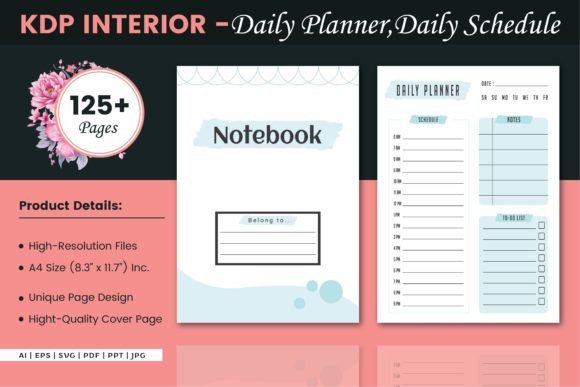
Turning a Daily Schedule – KDP Interior Into a Reliable Publishing Asset
Every low-content book project starts with a clear interior file that defines how the final product feels in a customer’s hands. For a daily planner or organizer, that interior isn’t just a set of lines and boxes—it’s the core tool someone relies on to structure their day. The Daily Schedule – KDP Interior package provides a ready-made layout that eliminates design guesswork and shortens the path from idea to published book. Understanding how this asset fits into a broader publishing workflow saves time, reduces costly formatting errors, and helps you deliver a product that meets buyer expectations on Amazon.
This isn’t about throwing a PDF onto KDP and hoping for the best. When you treat the interior as a building block within a larger system—one that includes cover design, niche selection, file preparation, and customer usage patterns—you gain far more control over the outcome. The package includes 100 ready-to-upload pages across multiple editable formats, so you can adapt, brand, or simply publish as-is depending on your goals. What matters most is knowing how to align this resource with your specific publishing or personal organization process.
Where a Daily Schedule Interior Fits in the Low-Content Publishing Process
Publishers often jump straight to uploading without mapping the entire creation chain. A daily planner interior sits at the center of three phases: pre-production planning, asset customization, and platform compliance. During pre-production, you decide on a target audience—students, remote workers, entrepreneurs, parents managing household routines—and verify that the daily layout matches their scheduling needs. The Daily Schedule – KDP Interior follows a standard A4 format at 8.3 x 11.7 inches with no bleed, which prints cleanly and meets Amazon’s trim size requirements without extra margin adjustments. That alone removes a common technical hurdle.
In the customization phase, the editable source files (AI, EPS, SVG, PDF, PPT, JPG) let you modify elements like time blocks, task sections, or header text. A publisher creating a niche morning routine planner might adjust the hourly range to start at 5 AM rather than 8 AM, then export a fresh PDF. Because the file is vector-based, resizing or tweaking design elements won’t degrade clarity. This flexibility means you don’t have to accept a generic layout—you can build something that speaks directly to a specific buyer group while still relying on a tested structure.
Making the Most of Multiple File Formats
Not everyone works in Adobe Illustrator. The availability of six format types addresses real-world workflow variation among creators, marketers, and small business owners. Here’s how each format typically fits into a practical process:
- AI and EPS: Use these when you want full design control. Open in Illustrator to adjust line weights, add branding, or create alternative page versions.
- SVG: Ideal for web-based editing tools or lightweight customizations without heavy software. Upload to Canva or Inkscape to quickly tweak colors or add icons.
- PDF: The direct-to-KDP file. After any edits, export as a print-ready PDF, confirm page count (125 pages), and upload. No bleed means you don’t add trim marks—just a straightforward interior block.
- PPT: Some creators prefer PowerPoint for text-heavy adjustments. This format works well for educators or coaches who want to add instructional prompts before printing or selling.
- JPG: Quick preview or mockup creation. Use these to generate product images for your KDP listing, showing how pages look when printed.
Having these options means you can collaborate with a designer who prefers EPS, then hand off a PDF to someone handling uploads—without converting or rebuilding. That kind of format fluidity keeps your publishing queue moving faster.
Practical Steps Before Hitting Publish
Even a high-quality interior file needs a pre-flight check to avoid customer complaints and returns. Before you upload the Daily Schedule – KDP Interior directly, run through these verification points:
- Page count consistency: The interior includes 125 pages. Confirm that the total page count matches what you advertise in your listing description and what Amazon expects. Mismatches lead to negative reviews.
- Margins and spacing test: Print a few pages at home on A4 paper. Hold the printed sheet against a light source to check that time slots, note areas, and headers don’t creep too close to the edge. Since the file is no-bleed, comfortable margins are already built in, but a visual check catches any scaling issues from export settings.
- Originality check: If you plan to sell the planner as-is, understand that many other publishers may use the same base file. Even minor customizations—changing the cover, adding a unique intro page, or altering the schedule section—help differentiate your product and improve discoverability.
- Cover integration: The package includes an extra cover page, but your KDP cover will need a separate file matching the book’s trim size and spine width (calculated by Amazon based on page count and paper type). Use the included cover as a styling reference, but create a full wrap in your design tool to meet KDP’s cover requirements.
Integrating the Planner Into a Daily Productivity Routine
While this asset is primarily designed for publishers, many productivity-minded individuals download such interiors to manage their own schedules. If you’re using the Daily Schedule – KDP Interior personally, treat it as a flexible framework rather than a rigid template. Print the A4 pages and bind them into a disc-bound notebook, or load the digital PDF into a note-taking app like GoodNotes on a tablet. The daily layout helps you segment tasks, track appointments, and review accomplishments without the distraction of overly decorative design.
The real value shows up when you connect the daily schedule with other planning methods. For example, a freelancer might use the daily page as their core task capture tool while maintaining a weekly review in a separate notebook or app. The daily sheet becomes the execution layer, while a separate system handles long-term project milestones. This prevents the planner from becoming a catch-all that loses its daily focus.
Maintaining Consistency Across Multiple Planners
Publishers creating a series of planners—daily, weekly, monthly, habit trackers—benefit from a consistent interior design language. The Daily Schedule – KDP Interior can serve as a design anchor. By pulling design elements (line styles, font choices, block proportions) from this file into companion interiors, you create a unified product line that feels professional and intentional. With editable source files, you can extract those design decisions and apply them to other layouts, building a cohesive brand without starting from scratch each time.
When scaling your KDP catalog, consistency also simplifies quality control. Once you establish production standards—export settings, PDF version, file naming conventions—you replicate them across every project. The no-bleed A4 spec removes a variable that often trips up newcomers, so you can focus on content differentiation rather than technical fixes.
Long-Term Utilization and Asset Management
Treat the Daily Schedule – KDP Interior as a reusable asset that evolves with your publishing goals. Store the original files in a well-organized folder structure with version notes. If you later identify a market gap—say, a need for a minimalist schedule without hourly breakdowns—you can return to the base AI file, delete unnecessary elements, and export a new variant in under an hour. This repurposing approach maximizes the initial investment and reduces dependency on constant new asset purchases.
Additionally, subscribe to the creator’s profile if their style aligns with your niche. When you find a reliable source that delivers consistent quality and format variety, staying connected means you spot complementary interiors—like matching journal pages or tracking sheets—that fit naturally into your existing lineup. Over time, this builds a library of interlocking resources that reduce design time and keep your KDP store fresh.
Real-World Workflow: From Download to Live Listing
Let’s walk through a typical workflow for a publisher launching a daily planner intended for remote workers. After downloading the package, they open the AI file to add “work from home” themed headers and a subtle icon next to the date field. They export a print-ready PDF using 300 dpi, CMYK color space (even if grayscale interior, this ensures clean blacks). They then combine the PDF with a separately designed cover file that uses the extra cover page as a branding guide. The trim size is set to 8.5 x 11 inches—slightly larger than A4 to match standard US trade sizes—but because the interior is no-bleed A4, they can center the page content on a larger trim without distortion. This requires careful scaling and adding blank margins, which some publishers find easier than starting from square one.
After uploading, they order a proof copy to check binding, paper quality, and print alignment. The proof reveals that page numbers sit too close to the bottom edge on left-hand pages, so they adjust the master page in the AI file, re-export, and update the KDP file. Within a few days, the planner goes live. The customer receives a well-structured tool that feels intentionally designed for their work-from-home context—not a generic template with a slapped-on cover.
Important Considerations for Long-Term Success
Compatibility with Amazon’s evolving guidelines matters. Periodically review KDP’s content policies and trim size requirements. If Amazon updates its no-bleed interior rules, having the editable source files means you can adapt without repurchasing. Also, consider paper type: cream paper often works better for interior pages to reduce glare, but some print-on-demand services may render subtle design elements differently. Test on a physical proof before scaling.
Usability feedback from buyers can guide future edits. If reviewers note that the hourly blocks are too small or the note section too cramped, return to the AI file and adjust. You can release a revised edition of the same planner, retaining existing reviews while improving the product. This data-driven iteration strengthens your publisher authority and customer satisfaction over time.
Expanding the Use Beyond Traditional Planning
The daily schedule format extends into unexpected niches. A coach might use these pages within a client workbook, where each session includes a daily action plan. A teacher could adapt the template as a student assignment tracker, printing only the pages needed for a semester. The Daily Schedule – KDP Interior becomes a raw material that supports creative repurposing—not just a static planner. When you view the interior as a flexible framework, you unlock additional revenue streams without additional design overhead.
In collaborative teams, sharing the PPT or PDF formats allows non-designers to provide input on layout changes. A marketing team can quickly flag that the schedule lacks a priority column, and the designer implements the change directly in Illustrator. This reduces back-and-forth and keeps the project aligned with market needs.
Ultimately, what elevates a simple interior file into a productive asset is the workflow wrapping around it. Clear file organization, step-by-step verification, understanding of platform requirements, and a willingness to iterate based on real-world use transform the Daily Schedule – KDP Interior from a static download into a dependable cornerstone of your publishing or personal planning strategy. Whether you launch one planner or scale a catalog of ten, the principles of preparation, compatibility, and consistent quality control remain the same.