Transform Your Homeschool Year with the Right Planner Interior
You’ve probably seen countless PDF planners promising to organize your entire life, but when it comes to homeschooling, a generic bullet journal won't cut it. That's where the Homeschool Planner 2024 PDF KDP Interior steps in—a purpose-built resource designed to bring clarity to the chaos of educating multiple children at once. Whether you're a parent managing a large family or a self-publisher looking for a high-quality interior to offer your customers, understanding what makes this particular planner valuable can save you hours of frustration and prevent costly mistakes down the line.
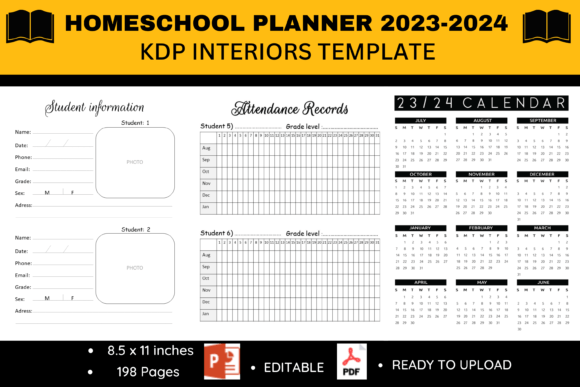
At its core, this product is a ready-to-upload PDF file containing 198 pages of clean, simple interior design. It’s crafted for tracking up to six students, making it a standout for families juggling different grade levels. But the real power lies in the thoughtful selection of pages: academic calendars, weekly lesson layouts, reading logs, grade trackers, and even space for communication logs. Before you download, purchase, or publish, let’s walk through the common missteps people make with such planners and how you can avoid them for a smoother, more organized year.
Misunderstanding the Scope: It’s Not Just a Calendar
A frequent error is treating any homeschool planner as a simple datebook. The Homeschool Planner 2024 PDF KDP Interior is far more than that. Skimming over the table of contents is the first mistake. Many users jump straight to the weekly lesson grids and ignore the supporting pages that tie everything together. For example, the Important Dates section isn't redundant; it’s where you mark field trips, testing windows, and co-op days that affect your weekly rhythm. Skipping the Communication Log might seem harmless, but when you need to recall a conversation with an evaluator or tutor three months later, you’ll wish you had it.
To avoid this, take fifteen minutes to flip through the entire file digitally before printing or binding. Notice how the Student Information with Photo pages sit next to the Contacts List. This isn't random. It allows you to pull up emergency contacts alongside each child’s details without searching. The Website Logins page saves precious minutes every day when your student needs to access an online math portal. Use these pages proactively, and the planner transforms from a schedule keeper into a central command hub for your home learning environment.
Overlooking Format and Print Specifications
One of the most costly oversights happens before the first page is even printed. The product details clearly state it’s 11.5 x 8 inches. That’s a slightly non-standard size between letter and A4. If you assume it’s standard letter and send it to your home printer without adjusting settings, you’ll likely get cut-off edges or awkward margins. For KDP publishers, uploading without checking trim size requirements can lead to rejected proofs or unhappy customers who receive a book that doesn't look as expected.
Before you do anything with the file, open it in a PDF reader and verify the dimensions. If you're printing at home, select “Actual Size” or set a custom scale. For professional printing or KDP, double-check that your chosen trim size exactly matches 11.5 x 8 inches and that all content stays within safe margins. Also note the page count: 198 pages. That’s substantial. If you plan to spiral-bind it, ensure the coil size can handle the thickness. A mismatch here can leave you with a planner that won’t lay flat, defeating the purpose of an easy-to-use daily tool.
Ignoring the Editable PowerPoint File
Many users treat the PDF as the only asset, completely bypassing the included editable PowerPoint file. This is a significant missed opportunity, especially for families with unique needs or publishers who want to brand the interior. Maybe your state requires a different type of attendance log, or you need to rename the “Grades” section to “Progress Reports” for your charter school. The PowerPoint file lets you make those changes without starting from scratch.
However, a caution: editing a well-designed layout can quickly turn into a visual mess if you’re not careful. Stick to the existing fonts and spacing as much as possible. If you add a new page, mirror the clean, simple aesthetic that makes this interior appealing. For KDP sellers, customizing a few pages with your own logo or a unique bonus page can differentiate your book in a crowded marketplace. Just remember to save a copy of the original file before you make changes—you’ll want a clean baseline to fall back on if an edit goes sideways.
Treating It as One-Size-Fits-All Without Adaptation
No planner, no matter how thorough, anticipates every family’s exact rhythm. A common frustration arises when users try to force their dynamic into the planner’s structure rigidly. The Daily Schedule page might have time slots that don’t match your block schedule, or the Weekly Lessons Planner might assume a five-day school week when you follow a four-day cycle. Instead of abandoning the whole system, adapt intelligently.
For instance, use the Daily Schedule not as a minute-by-minute taskmaster but as a loose framework. Write your morning block as “8:00–10:00 Core Work” instead of splitting it into fifteen-minute increments. If the weekly planner has space for five days, use the extra column for weekend enrichment activities or meal planning. The Year in Review page is brilliant for reflecting, but you might want to complete it quarterly rather than waiting until the very end. This flexibility prevents the planner from becoming just another chore and keeps it a helpful sidekick.
Underestimating the Power of the Paper Trail
Sections like the Communication Log, Meeting Notes, and Lined Notes Pages often get left blank because they seem administrative. This is a mistake that can catch up with you during portfolio reviews or if any questions arise about your educational approach. A concise note about a curriculum switch or a phone call with a therapist takes thirty seconds to record but provides invaluable context months later.
Imagine a scenario where your child’s reading progress appears to stall. Without the Reading Log and a few notes in the communication section about a vision screening you scheduled, you might overcorrect the curriculum unnecessarily. The data tells a story that your memory alone can’t hold, especially across six students. Use the Grades pages not just for final scores but to track weekly quiz results. This builds a robust record that supports both your teaching adjustments and any external accountability requirements.
Neglecting the Setup Phase Entirely
Perhaps the biggest trap is diving into daily entries without a solid setup. The planner includes an Academic Calendar 2023–2024 and a Birthdays page for a reason. Spend an hour at the start of your academic year transferring all known dates: holidays, birthdays, planned vacations, and term start and end dates. Then cascade those into the Monthly and Yearly Planner overview. This upfront work prevents double-booking and reveals pockets of time that are perfect for deep-dive projects or rest weeks.
For large families, coordinating multiple student timelines is delicate. Block out one afternoon to fill in each child’s extracurricular activities on the monthly spreads using a different colored pen for each student. When you later plan weekly lessons, you’ll instantly see conflicts. Without this synchronization, you risk overcommitting yourself and undoing the very organization you sought.
For KDP Publishers: Missing Quality Control Steps
If you’re on the publishing side, the mistakes shift slightly. Assuming the provided PDF is flawlessly print-ready without a proof is risky. Always order a physical proof copy from KDP. Check for ink density, alignment, and how the interior looks on cream versus white paper. The “high quality original art” claim is a starting point, not a guarantee that every element translates perfectly in print. Pay special attention to the grayscale reproduction if you’re not printing in color—those subtle lines on the Weekly Lessons Planner need to stay visible.
Additionally, verify that the Table of Contents page accurately reflects the final page numbers after any edits you made. A mismatch confuses users and can lead to negative reviews. If you added the PowerPoint editable file as a bonus, ensure the download instructions are clear and compliant with KDP’s terms. A little due diligence here protects your author reputation and ensures the end buyer receives the organized tool they were promised.
How to Make the Most of the Multi-Student Feature
A standout advantage of this interior is the capacity for up to 6 students. Yet without a system, those six sets of records can become muddled. Use sticky tabs or color-coded washi tape to mark each student’s section in the weekly planner. Store loose papers like completed artwork or certificates in a pocket folder affixed to the inside cover, referencing the Student Information pages to quickly note accomplishments. When you sit down for a review, pull up the Grades and Reading Log for each child side by side. This macro view often reveals patterns—maybe one student devours history books while another needs more hands-on science—which helps you tailor resources effectively.
Don’t feel pressured to fill every field for every student daily. The planner’s strength is being a framework, not a jailer. Some days you’ll log detailed lesson notes; other days a simple checkmark suffices. The Lined Notes Pages are perfect for capturing the spontaneous learning moments that traditional planners miss: a kitchen chemistry experiment, a nature walk discovery, or a breakthrough in a sibling reading session. These memories are what make a homeschool planner truly yours.
Checking Before You Commit
Before you buy or upload the Homeschool Planner 2024 PDF KDP Interior, ask yourself a few practical questions. Does the 11.5 x 8 inch format fit your binding method? Is your printer capable of handling 198 pages in a way that’s cost-effective? For publishers, have you researched the competition to see how you can position this interior differently, perhaps by offering a matching cover file or a video walkthrough? And for families, does the inclusion of 2023–2024 academic calendar align with your school year, or do you need a different date range? Catching these details early turns a good purchase into a great long-term tool.
Ultimately, a planner is only as effective as the intention behind it. The clean, essential-tracking design of this interior eliminates fluff while giving you the bones of a strong organizational system. By steering clear of the common pitfalls—ignoring setup, misusing the format, overlooking editable options, and underusing vital logs—you create a tailored command center that evolves with your family’s educational journey. Whether you’re printing one copy for your kitchen or publishing hundreds for other homeschooling parents, the value lies in thoughtful, informed use.